Search Engine Optimization (SEO) Best Practices
The NC State Theme includes several built-in search engine optimization (SEO) features designed to help your website rank better in search results and appear more prominently when shared on social media. This guide covers the SEO tools available in the theme and best practices for maximizing their effectiveness.
Built-in Metadata Fields
Every page and post in the NC State Theme includes dedicated fields for search engine and social media metadata. These fields appear at the very bottom of the back-end editing page and provide crucial information that helps search engines and social platforms understand and display your content.
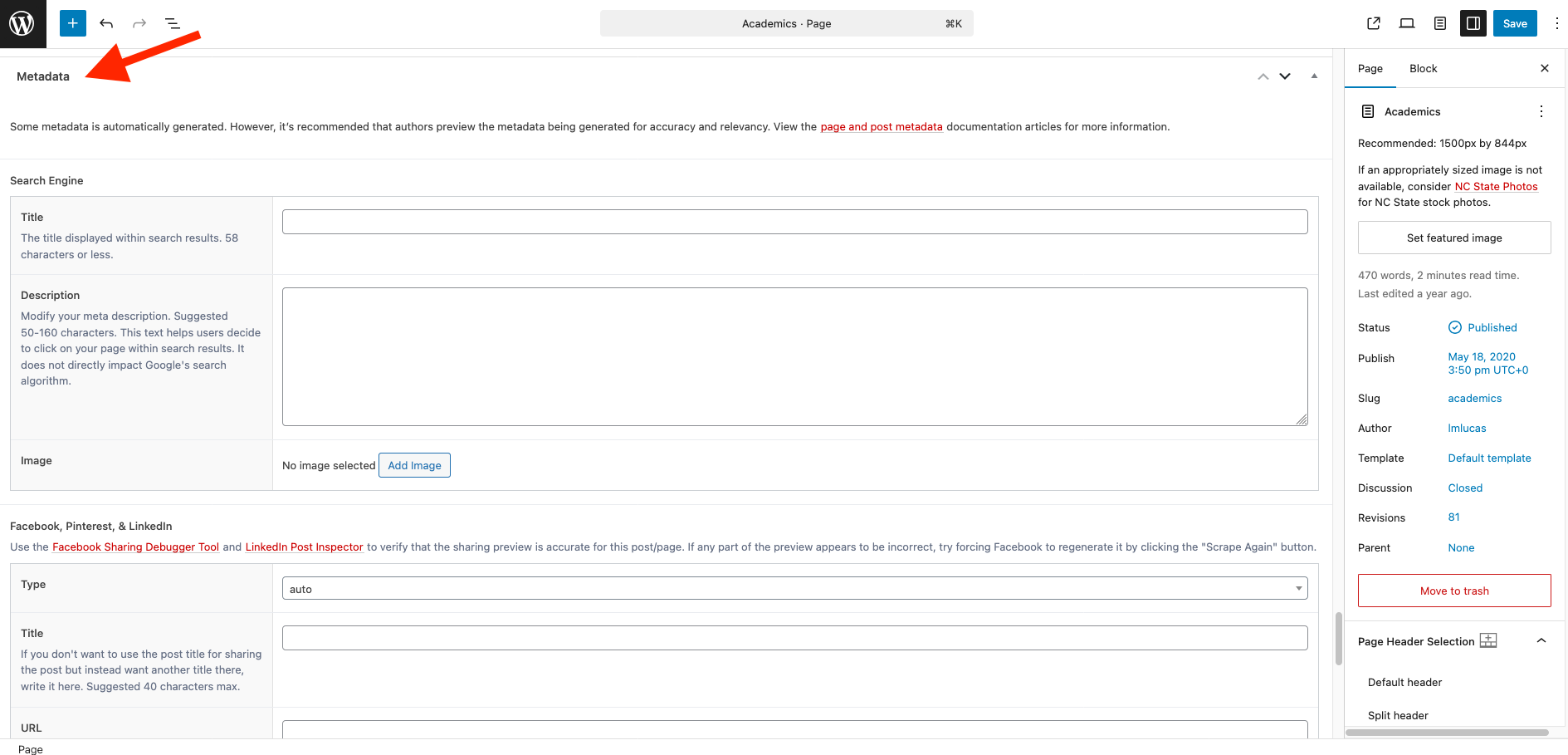
What is Metadata?
Metadata is “data about data” – it’s information that describes your web page content to search engines and social media platforms. When someone searches for content or shares your page on social media, this metadata determines how your page appears in search results and social media feeds.
Search Engine Metadata includes:
- Title tags: The clickable headline that appears in search results
- Meta descriptions: The brief text snippet that appears below the title in search results
- Meta images: The image that may appear alongside your content in search results
Social Media Metadata includes:
- Open Graph tags: Control how your content appears when shared on Facebook, LinkedIn, and other platforms
- Twitter Card tags: Optimize how your content displays when shared on Twitter/X
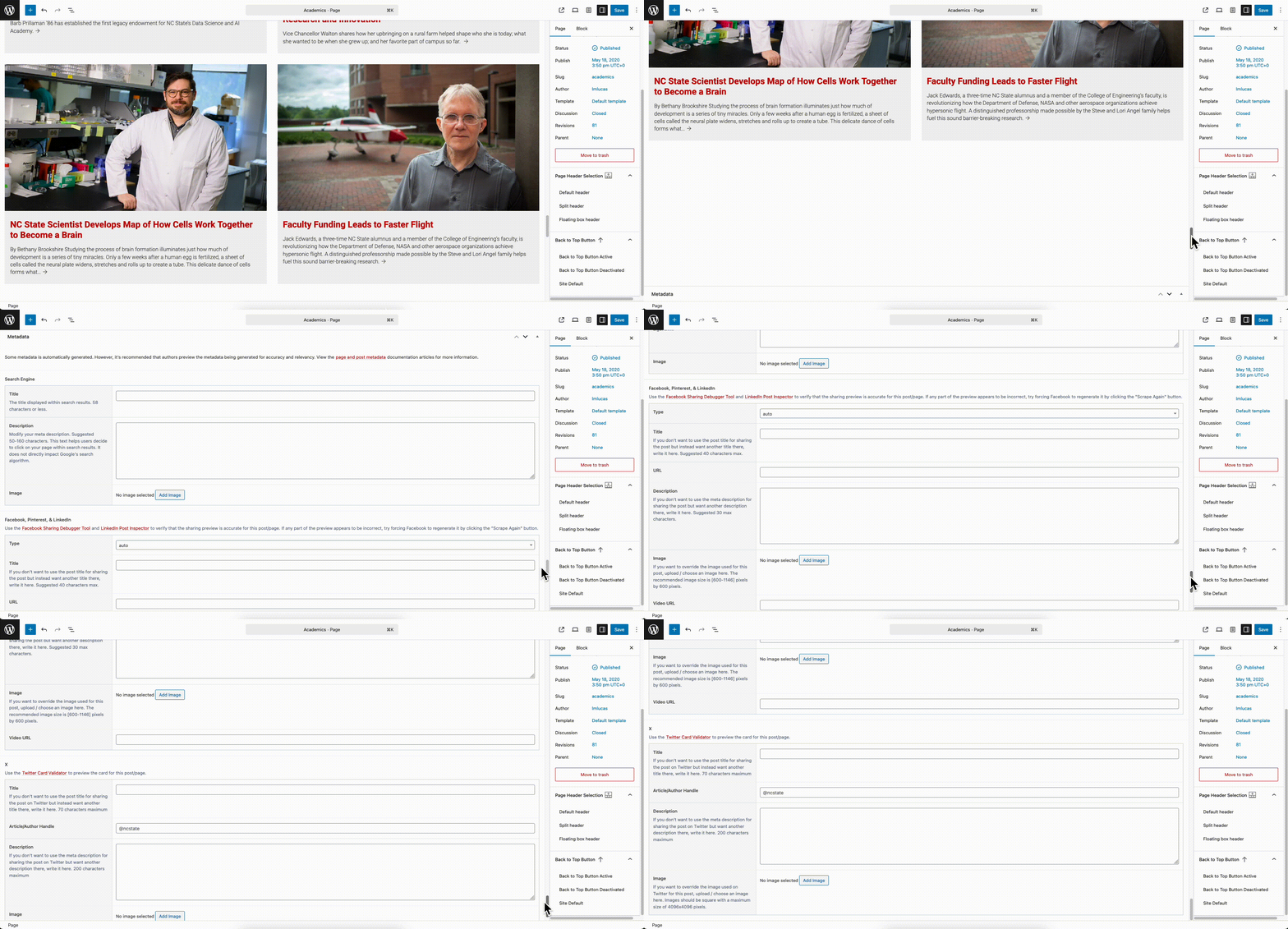
Why Populate Metadata Fields?
Completing these metadata fields provides several key advantages:
Improved Search Visibility: Well-crafted titles and descriptions can improve your click-through rates from search results, which can positively impact your search rankings.
Better Social Media Engagement: When your content is shared on social platforms, properly configured metadata ensures it displays with an attractive image, compelling title, and informative description rather than generic fallback content.
Brand Control: You control exactly how your content appears across different platforms, ensuring consistent messaging and professional presentation.
User Experience: Clear, descriptive metadata helps users understand what they’ll find on your page before they click, leading to more qualified traffic.
Character Count Guidelines
The theme provides back-end guidance on ideal character counts for metadata fields:
- Title tags: Keep titles between 50-60 characters to ensure they display fully in search results
- Meta descriptions: Aim for 150-160 characters to provide enough detail while avoiding truncation
- Social media titles: May have different optimal lengths depending on the platform
Image Dimension Guidelines
The theme also provides guidance on optimal image dimensions for metadata images. Using properly sized images ensures your content displays correctly across different platforms and devices without distortion or cropping issues.
Automatic Metadata Population
The NC State Theme includes intelligent fallback behavior for metadata fields. If you don’t manually populate these fields, the system will automatically use:
- Page/Post titles for the metadata title field
- Featured images for the metadata image field
- Post excerpts for the metadata description field
While this automatic population is helpful, manually crafting your metadata often produces better results since you can optimize specifically for search engines and social media rather than relying on content that may have been written for other purposes.
Site Title Configuration
WordPress General Settings
The foundation of your site’s SEO starts with properly configuring your site title. This is set in the standard WordPress location:
- Navigate to Settings → General
- Set your Site Title field
This title appears in your website’s <title> tag, which is one of the most important SEO elements on your site.
Separate Masthead Title
The NC State Theme offers flexibility for sites that need different titles for SEO purposes versus what appears visually on the site. If you want the title that appears in search results to be different from what visitors see in your site’s masthead, you can configure a separate masthead title:
- Go to NC State Settings → NC State Theme → General
- Set a Site Title that will only appear in the masthead area
This feature is particularly useful for organizations that need to include full official names in their SEO title but prefer shorter, more user-friendly names in their visual branding.
Built-in SEO Code Optimization
The NC State Theme is built with SEO best practices coded directly into the theme structure. These optimizations work behind the scenes without requiring any action from site administrators or content maintainers, but they provide significant SEO benefits:
- Semantic HTML structure: The theme uses proper HTML5 semantic elements that help search engines understand your content hierarchy
- Clean, valid code: Well-structured code helps search engines crawl and index your site more efficiently
- Mobile-responsive design: Google prioritizes mobile-friendly sites in search results
- Fast loading times: Site speed is a ranking factor, and the theme is optimized for performance
- Proper URL structure: Clean, descriptive URLs that include relevant keywords
Content Best Practices for SEO
While the theme provides the technical foundation, the most important SEO factor is creating high-quality, well-structured content. Here are key practices to follow:
Header Hierarchy
Use proper heading structure to organize your content:
- H1 tags: Use only one H1 per page (typically your page title)
- H2 tags: Use for main section headings
- H3 tags: Use for subsections under H2s
- H4-H6 tags: Use for further subdivisions as needed
Proper header hierarchy helps search engines understand your content structure and improves accessibility for users with screen readers.
Strategic Use of Lists
Organize information using bulleted or numbered lists when appropriate. Lists make content easier to scan for users and can help search engines understand key points. They’re particularly effective for:
- Step-by-step instructions
- Features or benefits
- Key takeaways
- FAQ sections
Strategic Text Formatting
Use bold text to emphasize important keywords and phrases, but do so sparingly and naturally. Over-bolding can appear spammy to both users and search engines. Bold text should enhance readability and highlight genuinely important information.
Image Optimization
Optimize images for both users and search engines:
Alt Text: Always include descriptive alt text for images. Alt text serves multiple purposes:
- Improves accessibility for users who rely on screen readers
- Provides context to search engines about image content
- Displays when images fail to load
- Can contribute to image search rankings
Write alt text that accurately describes the image content and context within your page.
Image Filenames: Use descriptive, keyword-rich filenames before uploading images. Instead of “IMG_1234.jpg,” use descriptive names like “nc-state-campus-bell-tower.jpg.” This helps search engines understand image content and can improve image search visibility.
Image Size and Format: Use appropriately sized images to ensure fast page loading. The theme may provide guidance on optimal image dimensions for different contexts.
Content Quality and Relevance
Focus on creating valuable, original content that serves your audience’s needs. Search engines increasingly prioritize content that demonstrates expertise, authoritativeness, and trustworthiness (E-A-T). This means:
- Writing comprehensive, accurate information
- Citing credible sources when appropriate
- Keeping content current and updated
- Using clear, natural language rather than keyword stuffing
- Organizing content logically with clear navigation
Monitoring and Maintenance
While the NC State Theme provides excellent SEO foundations, ongoing monitoring and maintenance will help ensure continued success:
- Regularly review and update metadata for important pages
- Monitor site performance and loading speeds
- Keep content fresh and relevant
- Review analytics to understand which content performs best
- Stay informed about SEO best practices as they evolve
The combination of the NC State Theme’s built-in SEO features and following content best practices will help ensure your website is well-optimized for search engines while providing an excellent user experience.