Synced Patterns: Strategic Implementation Guide
Synced patterns are reusable block collections in WordPress that maintain consistency across multiple pages. Unlike regular patterns that simply provide a starting template, synced patterns update automatically across your entire site when edited in one location. This powerful functionality helps maintain design consistency and significantly reduces content maintenance time.
Creating a Synced Pattern
Creating a synced pattern is straightforward:
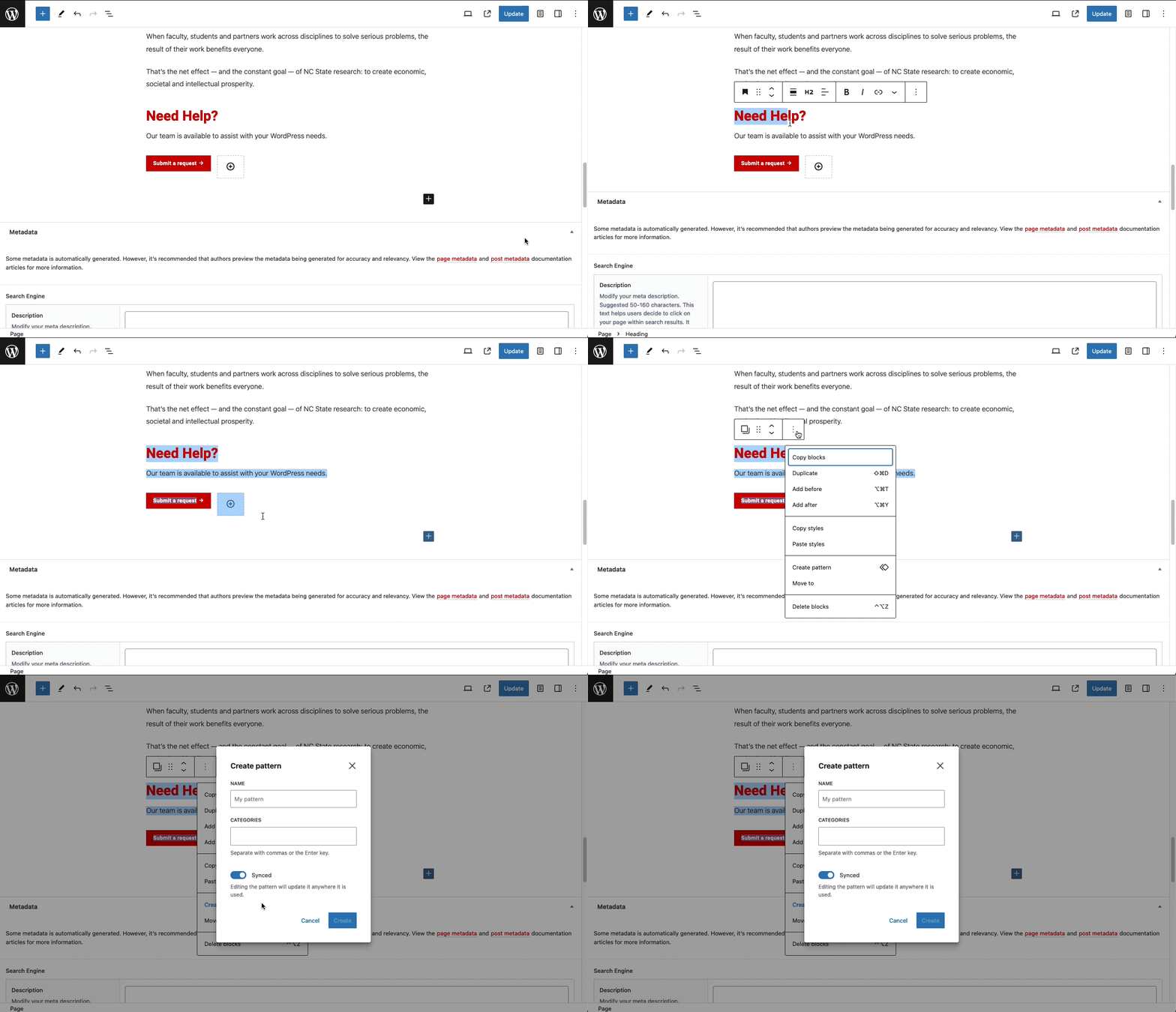
- Build your pattern: Design the collection of blocks you want to reuse across your site.
- Select the blocks: Highlight all blocks that should be part of your pattern.
- Create the pattern: Click the three-dot menu in the toolbar and select “Create Pattern”.
- Configure settings: Give your pattern a descriptive name, optionally assign it to a category, and most importantly – enable the “Sync” option.
- Save the pattern: Click “Create” to finalize your synced pattern.
Adding Synced Patterns to Pages
Once created, you can add your synced pattern to any page:
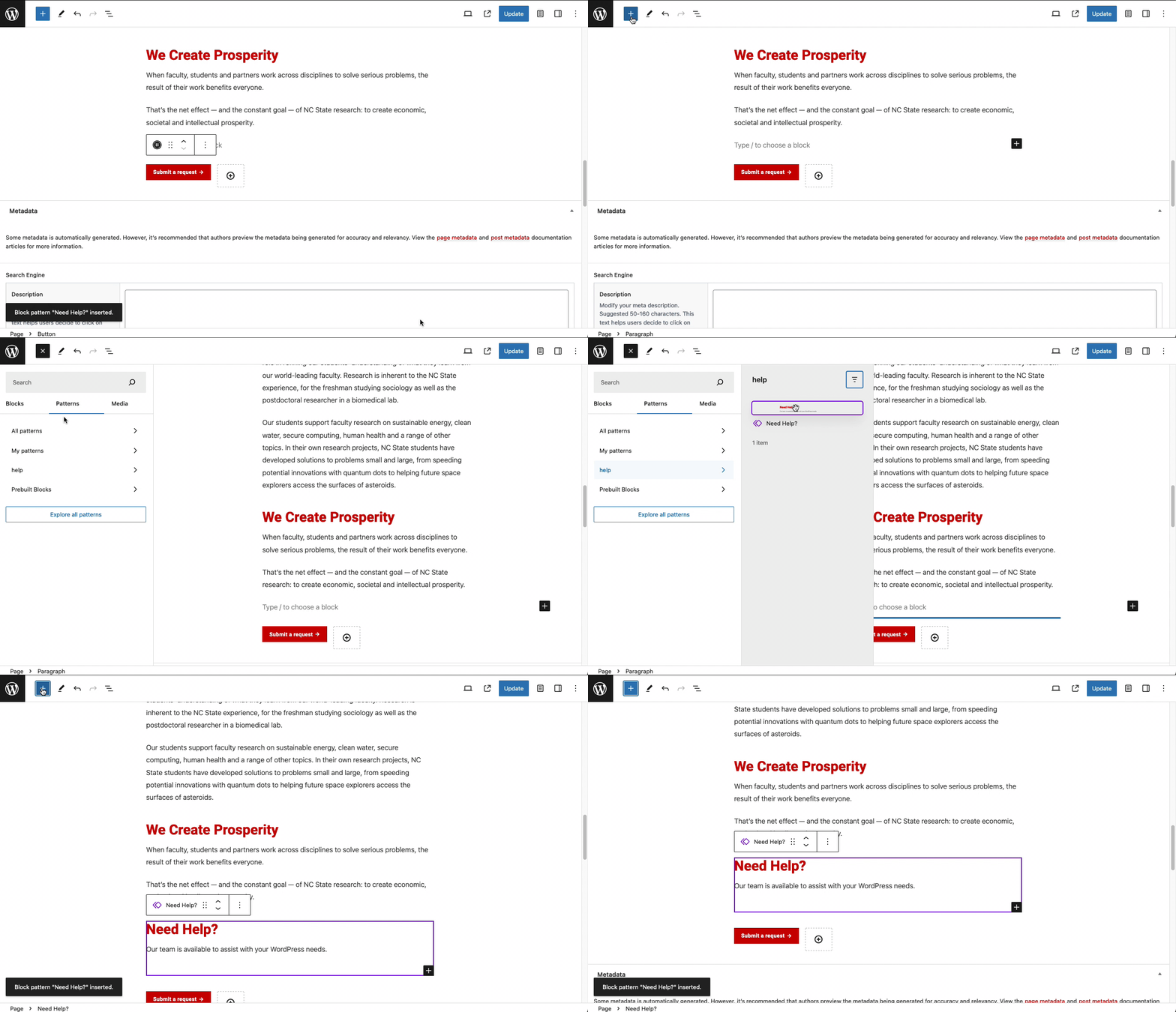
- Click the “+” icon to add a new block
- Navigate to the “Patterns” tab in the block inserter
- Find your synced pattern (by name or category)
- Click on it to add it to your page
Synced vs. Non-Synced Patterns
Understanding the difference between synced and non-synced patterns is crucial:
Synced Patterns:
- Update automatically everywhere when changed in one location
- Maintain consistency across your entire site
- Ideal for content that should always be identical (e.g., contact information, legal notices)
Non-Synced Patterns:
- Act as templates/starting points only
- Changes only affect the pattern where edits are made
- Useful when you want the same structure but different content (e.g., team member profiles)
Strategic Uses for Synced Patterns
1. Contact Information
Create a synced pattern containing your department’s contact details, office hours, and location. When this information changes, update it once to have it automatically update everywhere it appears on your site.
2. Department Policies
For frequently referenced policies or procedures, create a synced pattern to ensure all mentions stay current and consistent.
3. Standard CTAs (Calls to Action)
Create standardized call-to-action patterns for common conversion goals like program applications, event registrations, or newsletter sign-ups.
4. Promotional Campaigns
For time-limited promotions, create a synced pattern that can be quickly updated or disabled from a single location when the campaign ends.
5. Resource Collections
Build a synced pattern containing frequently recommended resources that can be updated as new materials become available.
Best Practices
- Use descriptive names: Name your patterns clearly so they’re easy to identify in the pattern selector.
- Create pattern categories: Organize your patterns by function (e.g., “Headers,” “CTAs,” “Contact Information”) to make them easier to locate.
- Limit complexity: While you can include many blocks in a pattern, simpler patterns are easier to manage and less likely to break unexpectedly.
- Document dependencies: If your pattern depends on specific plugins or functionality, document this for your team.
- Consider performance: Too many synced patterns on a page can affect load times, so use them strategically.
- Test across devices: Ensure your patterns look good on all screen sizes before implementing them widely.
Troubleshooting Common Issues
Pattern Not Updating Everywhere
If your synced pattern isn’t updating across all pages:
- Verify the pattern is actually set to “Sync” mode
- Refresh page caches
- Clear your browser cache
- Check for plugin conflicts
Pattern Layout Issues
If your pattern layout breaks when added to certain pages:
- Check for CSS conflicts with your theme
- Verify all required plugins are active
- Test with simpler content first
Need Help?
Still unsure about using synced patterns? Feel free to reach out with any questions or concerns at go.ncsu.edu/ucomm-dev-request.