Heading Block
Overview
Heading blocks are used on almost all types of pages. Most web users do not read everything on a web page word-for-word. Rather, they skim to try to find the section of content that might answer the question that they have. Well-structured headings help with this navigation process.
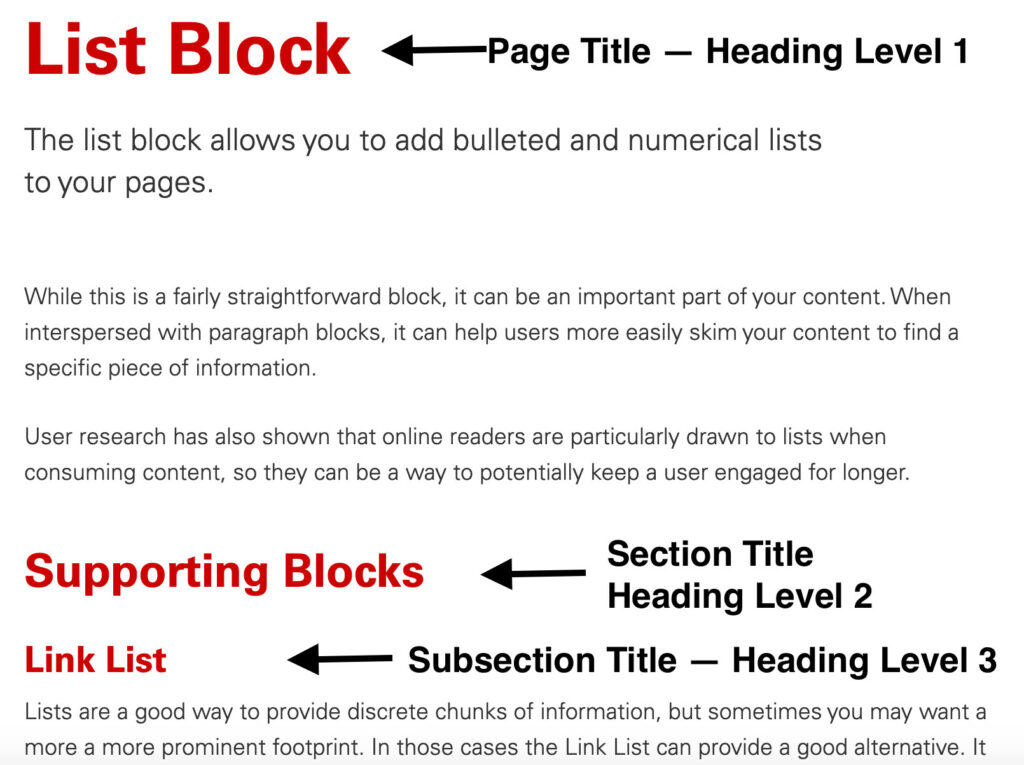
Web pages have six “levels” of headings. Correct usage of the heading levels is important for the following reasons:
- They help create an outline of content that screen reader users leverage to navigate through a web page.
- They help provide semantic meaning to your web page so that search engines can better crawl your site’s content. The better a search engine can understand your content, the higher you are likely to appear in search results.
- Assuming all content maintainers of a site are using headings correctly, they help create a consistent look-and-feel as users navigate through your site.
Using Heading Levels Correctly
Proper heading structure is essential for web accessibility. Headings are not just visual styling tools — they create a meaningful outline of your content that assistive technologies rely on to interpret and navigate a page.
There are a few key principles to follow to ensure your heading levels are used correctly and accessibly:
Key Accessibility Considerations
- Use headings in sequential order: Do not skip heading levels (for example, going from H2 directly to H4). Screen reader users rely on a logical heading hierarchy to understand page structure.
- Include only one H1 per page: By web convention, the page title should be the single H1. This clearly identifies the main topic of the page for assistive technologies and search engines.
- Use H2s for main sections within the body: All headings within the body content should be H2 or lower. In the NC State Theme, inserting an additional H1 within the body is intentionally restricted to preserve proper structure.
- Use H3s and beyond only for true subsections: If you need to divide content within an H2 section, use an H3. Continue descending sequentially (H4, H5, H6) only when content structure genuinely requires it.
- Avoid deep heading levels when possible: If you find yourself using H4–H6 frequently, consider restructuring your content or splitting it across multiple pages. Overly complex hierarchies can make navigation more difficult for screen reader users.
Why This Matters
Screen reader users often navigate pages by jumping from heading to heading. A clear, consistent heading structure allows them to:
- Quickly scan page sections
- Understand relationships between topics
- Navigate efficiently without reading all content sequentially
When heading levels are used correctly, they create a predictable and accessible experience for all users — not just those using assistive technology.
Creating Heading Anchor Points
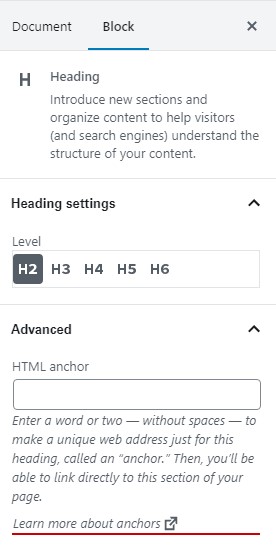
If you have a long web page with many sections, you might want to add an anchor point so that you link a user to the specific portion of the web page that will address their question.
Anchor points can be added by clicking in a heading block and then looking at the block’s settings in the right-hand panel. The “HTML Anchor” section lets you add an anchor point that you can then use in linking.
Need help?
Have questions? Feel free to reach out with any questions or concerns at go.ncsu.edu/ucomm-dev-request.