Resources Post Type
This feature of the NC State Theme allows content maintainers to create filterable and searchable databases. It is the most generic of all the post types included within the NC State Theme.
Primarily thought of as a way to list available resources, the post type is very flexible and can be renamed. This allows a content maintainer to choose whatever terminology best describes the content.
Creating Entries
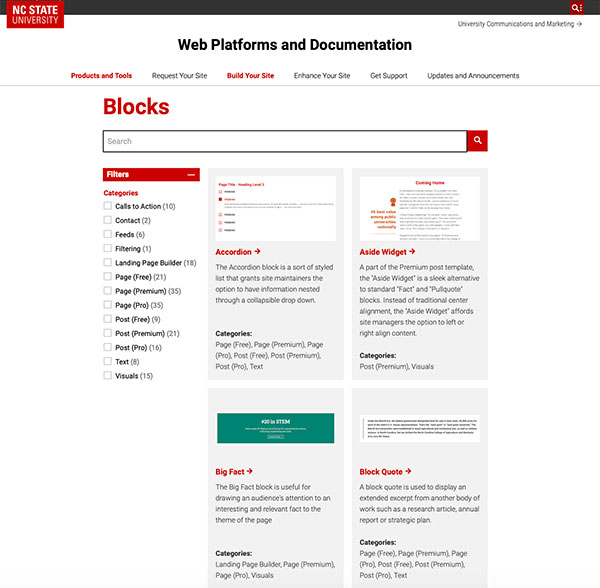
Each post (which can be thought of as a database entry) links to another URL of your choice. Each post has fields for a name, teaser/description, URL, and optional image.
Categorizing Entries
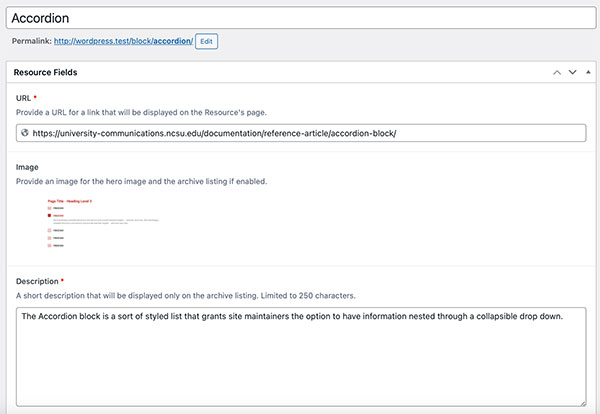
The real power with the Resources post type comes through categorization. You can place each post into one or more categories to allow users to easily filter for resources.
Adding New Taxonomies
The post type automatically includes categories as a taxonomy, but sometimes you need more than one taxonomy. For example, you might be building a database to list available classrooms that can be reserved. You might want one taxonomy to allow filtering by building and another taxonomy to filter by number of seats available.
Additional taxonomies can be easily added by using ACF Pro. This allows you to create however many additional taxonomies as needed, but it is recommended to not have more than five as too many choices can be overwhelming for users.
Renaming Post Type
If you would like to have a database of lab equipment that can be checked out by students, you could rename the post type to “Lab Equipment.”
These labels can be updated within the back-end of your site by going to NC State Settings -> Custom Post Types -> Resources and updating the following fields:
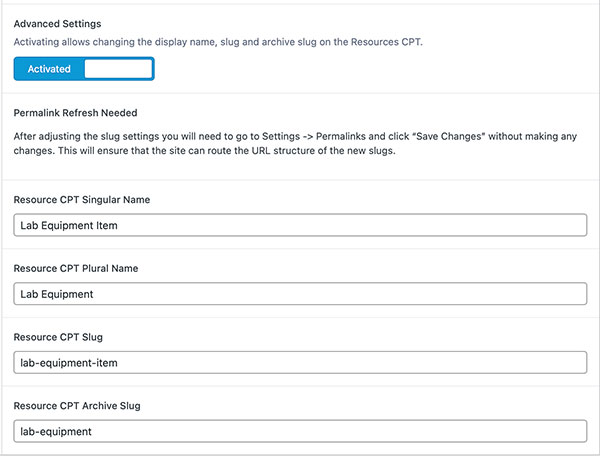
After updating these settings, you will likely need to go to Settings -> Permalinks and click “Save Changes” without making any adjustments to the permalinks. Clicking “Save Changes” forces WordPress to update all of the post type slugs and recognize the changes made above.
Adding Multiple Resources Post Types
The NC State Theme supports adding up to four Resources post types. This allows you to have multiple “databases” of different type of resources content on your site.
To enable additional Resources post types, go to NC State Settings -> Custom Post Types -> Resources to configure additional post types.