Noncredit Programs Post Type
The Noncredit Programs post type allows maintainers to create a filterable and searchable database of programs that do not provide credit toward an academic degree.
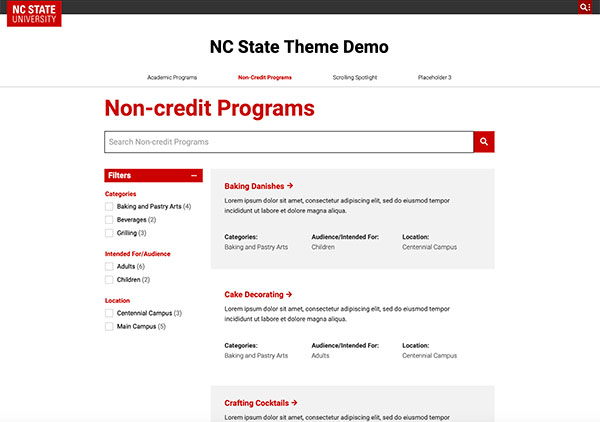
This post type is a good option to showcase programs such as workshops and summer camps. Maintainers can change the post type’s name to something more precise for a specific use case.
Entries are ordered alphabetically by default, but maintainers can also order entries by program date. In either sorting order, a program is no longer displayed once its program date passes.
Creating Entries
An individual program page is created by the post type. Based upon information provided on the back end, the page is automatically laid out.
If this page structure is too basic for a maintainer’s needs, the Redirection plugin can be used to make each entry link out to a chosen standard page.


Updating Post Type Name
Since “Noncredit Program” is a very technical name, in almost all cases maintainers will want to use a more specific name such as “Workshops” or “Summer Camps” for their specific post type.
To update the post type name, go to NC State Settings -> Custom Post Types -> Noncredit Programs and update the fields as shown below.
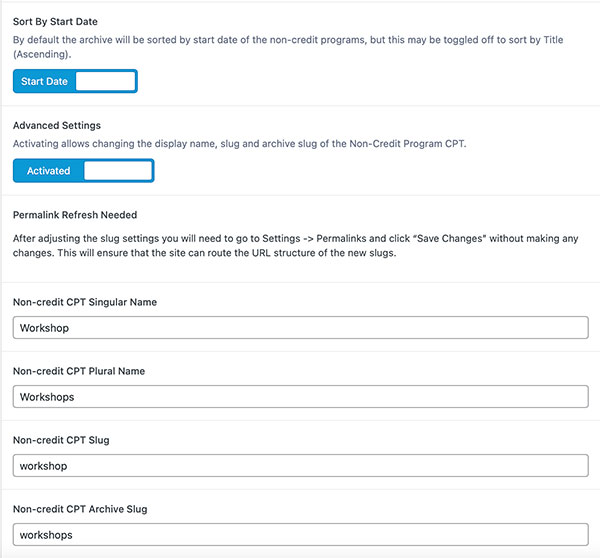
After updating these settings, maintainers will likely need to go to Settings -> Permalinks and click “Save Changes” without making any adjustments to the permalinks. Clicking “Save Changes” forces WordPress to update all of the post type slugs and recognize the changes made above.
Categorizing Programs
The Noncredit Programs post type includes a default way to categorize programs. This is helpful for grouping together programs with similarities, but maintainers may need additional taxonomies (such as location) given the wide variety of ways that this post type can be used.
Additional taxonomies can be added by using ACF Pro. This allows maintainers to create as many additional taxonomies as they need, but having more than five is not recommended, as too many choices can be overwhelming for users.