The News Homepage
The News homepage is one of many entry points to your news site, showcasing the newest and most top-of-mind content for readers.
Setting a News Homepage
In most cases, a basic news homepage is already created during your site’s setup, tailored to your unit’s content strategy. If you’d like to create an alternate page (temporarily or permanently), you can create and swap in a new one. UCOMM is available for feedback or assistance in meeting your strategic needs.
News homepages start like standard pages but are configured to ensure the best news content displays.
Template Selection
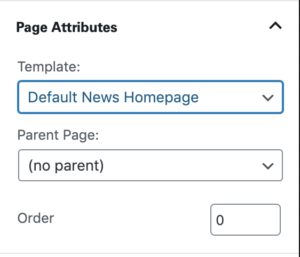
We strongly recommend using the “Default News Homepage” template (or a similar news-focused layout), selected via the Document Template dropdown in the Page Attributes panel of the Document settings sidebar.
This template is typically the starting point for customized content, but selecting it doesn’t enforce what displays on the page — it only provides a starting layout, leaving the final result up to you.
Starter Content
The “Default News Homepage” template includes a set of starter blocks you can use as a foundation for new News homepages via the Starter Content system.
Customizer: Homepage Settings
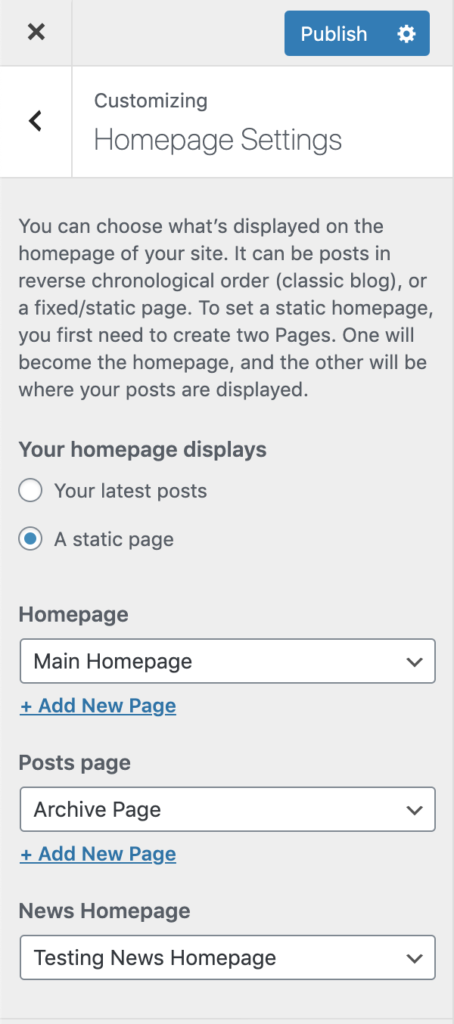
Once your news homepage has appropriate content, set it as either the “News Homepage” or “Homepage” in your site’s Customizer options. If your site combines marketing pages with news content, use the “News Homepage” dropdown. If it’s a standalone news site, use the “Homepage” dropdown.
Note that changing this page may change its URL. For example, if a previous news page’s URL was https://www.sciences.ncsu.edu/news and you switch to a page with a different URL, the new homepage would live at https://www.sciences.ncsu.edu/testing-news-homepage. Edit permalinks if you’re doing a complete replacement, or set up a redirect if the new URL is intentionally different.
Maintaining a News Homepage
A typical news homepage combines automated and manually curated content, emphasizing the newest and most relevant news from the unit.
Update areas vary by unit, since each homepage may use different block configurations. Most news homepages include:
HP Story Block
A manually curated block with one, two, or three stories per row. All stories require an image. Individual fields can be edited manually, but changes only display on this page (e.g., editing a story title here won’t update the original post’s title).
Featured Content
A fully manual block for curated content, with two- or three-column layouts. It can display content from various sources (posts, pages, external links, etc.) and can be reorganized across multiple rows.
Automated Posts
A fully automatic feed of content from posts on the local site, filterable by categories, tags, or custom taxonomies (if available).
Category Callout
A fully automatic feed highlighting the latest posts from a specific category (or custom taxonomy, if available).
Other blocks may also be used. In all cases, site maintainers should know where and when content requires manual updates.
Need help?
Have questions? Feel free to reach out with any questions or concerns at go.ncsu.edu/ucomm-dev-request.